News:

MultiCommander v16.6 is released!

Main Menu
Menu

Show posts

This section allows you to view all posts made by this member. Note that you can only see posts made in areas you currently have access to.

Show posts Menu

Messages - Dertuek

#1
I unchecked this option and haven't had the problem anymore  :)

Use multiple threads/cores when starting up (Faster startup)
#2
I saw that in the last changelog
QuoteFIXED - TabSessionManager will now make sure menu system is loaded before loading the tab session. (Since this should be added to menu system)
If this is related to the topic of this thread, I'm sorry to say that the issue still persists  :(
#3
I found a workaround. After MC is launched, I use the "Save As..." button to save the default session with a random new name. It refreshes the whole list. I delete the useless session then choose the right one.

As long as I don't have to restart MC 100 times, I can live with it :)
#4
Hello,

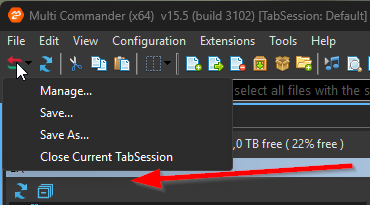
When I start MultiCommander, it very (too) often doesn't display any saved sessions when I click on the "Tab Sessions" button.


If I click on "Manage", I see all my sessions. The TabSessions.xml seems ok in the %APPDATA%/MultiCommander/Config folder.

I have to restart MC a bunch of time to finally get them. But today it doesn't work at all. That drives me nuts  :(

Any tips?
Thx
#5
I finally found other topics on this subject. It seems that I couldn't do it.
#6
Hello,

First of all thx for your software!

Something still annoys me. I display nothing in the right panel and I manually made the left fill the empty space on right side. But at startup, the left panel returns to its original size.

Thx