Author Topic: MC V17 Early Access PREVIEW 3  (Read 15 times)

Mathias (Author)

  • Administrator
  • VIP Member
  • *****
  • Posts: 5054
    • View Profile
    • Multi Commander
MC V17 Early Access PREVIEW 3
« on: Today at 15:17:43 »
Preview #2

----------------------------
Version 17 is not ready for stable release anytime soon, But it already has a lot of new things that need testing

Not everything added to v17 might be included in the final release.
v17 contain many MAJOR rewrites and new addition.

  • File Tags/Labels and comments system
  • Folder Specific settings
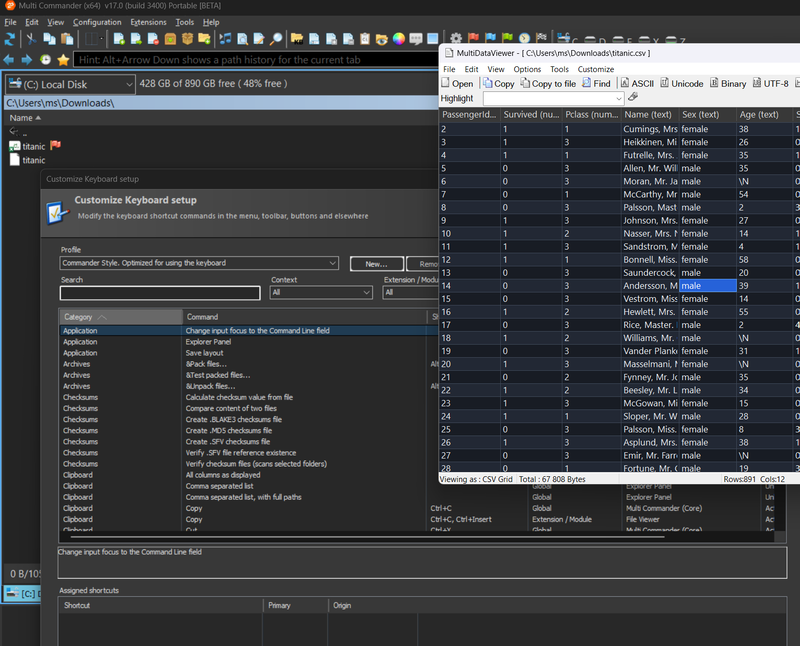
  • New Keyboard customization system
  • Total rewrite of List/Grid UI component used for File List view, FolderTree view, Most List/Grid UI componets. Without this rewrite all the 3 items above would not be possible
  • MultiFileViewer can now show CSV/Parquet files as data in a grid. and if it is CSV it can be edited and modified and saved backed
  • Some extension in MC can now be developed using .Net/C#
  • Checksum extension now support Blake3 checksum algorithm

This is a early preview. Since it is a early preview it is time locked. and will stop to work after sep-30. (but a new updated version will be out.. )
However it will not be possible to auto update this version until in reached beta. there might be more 16.x releases with fixes before this is officially out

Since this is early preview. NOW is the time to come with feedback you want something to change. How a features with file tags or folder specific settings works or something like that.

Since this preview is developed separately from v16.x, When a new preview is released, it might not have all the fixes or addition that 16.x has. Right not V17 Preview has everything 16.2 build 3205 has. (I think)

Read more and see images here
https://multicommander.com/Articles/multicommander-v17-preview-1

Download portable version here (64bit only) (Preview 3)
https://multicommander.com/files/updates/preview/MultiCommander_x64_Portable_(17.0.0.3415).zip


Test and leave feedback
Please do testing specially on Tags.. 
 How does tags work for you,  What missing with tag.. How can it be improved.  What does not work with tags. and so on.

Changes
v17 PREVIEW 3 (Build 3415) - 2026-09-28

Around 25+ Changes since Preview 2

  FIXED - Folder specific settings dialog changes
  ADDED - MultiFileViewer - Can now specify number of rows to skip when reading CSV data.
  ADDED - Shortcuts can now be assigned to Edit comment and Clear Comment
  FIXED - CSV Data grid now handle many columns better.
  ADDED - Shortcuts can now be assigned to Tags, Tags  popup
  FIXED - Rendering of file tags, Will not overwrite entire filename
  FIXED - Range selection (shift+click) issue.
  ADDED - Some new icons to be used in file tags
  ADDED - Support for converting and saving images into WebP format
  FIXED - Many other minor fixes.
  + All fixes in v16.5 up to build 3222
« Last Edit: Today at 15:52:26 by Mathias (Author) »

total_annihilation00

  • Power Member
  • ****
  • Posts: 219
  • Tech Savant\ Envisioneering
    • View Profile
Re: MC V17 Early Access PREVIEW 3
« Reply #1 on: Today at 15:53:54 »
Thank you Mathias, I'am happy to announce the Column Layout seems to be fixed —I'am ecstatic !!! :D Also there's a glitchy Gridlines that need to be fixed, it's drawing on top of the Checkboxes & folder items.
P.S: It could be because I didn't customize the font yet…
P.P.S: It's looking normal after customizing the fonts, but I don't know if it should draw over the Checkboxes like that
« Last Edit: Today at 16:07:05 by total_annihilation00 »
~The World's Deceit Has Raped My Soul, We Melt The Plastic People Down Then We Melt Their Plastic Town~


Mathias (Author)

  • Administrator
  • VIP Member
  • *****
  • Posts: 5054
    • View Profile
    • Multi Commander
Re: MC V17 Early Access PREVIEW 3
« Reply #2 on: Today at 16:01:03 »
You running 3rd party app that replaces windows theme ? Because that does not look like what MC drawn by default, Guess that the font you use are to small.. You can tweak and add extra height to a row in Explorer panel settings under Tweaking
« Last Edit: Today at 16:04:48 by Mathias (Author) »

total_annihilation00

  • Power Member
  • ****
  • Posts: 219
  • Tech Savant\ Envisioneering
    • View Profile
Re: MC V17 Early Access PREVIEW 3
« Reply #3 on: Today at 16:16:28 »
You running 3rd party app that replaces windows theme ? Because that does not look like what MC drawn by default, Guess that the font you use are to small.. You can tweak and add extra height to a row in Explorer panel settings under Tweaking

Yeah it was due to the fonts, sorry for the false report… Everything is working properly. I'll let you know if I run into any issues once I've customized it… I use WindowBlinds 10 on Windows 10 (for the dark theme.) 8)
# 1
I noticed something, when I close all Tabs in the Panel, then open an Explorer Panel, my Column Layout Sorting gets reverted to "Name" when it's always been "Date" (Descending). This doesn't happen in V16 though, it remembers the Column Layout Sorting. Could you fix this maybe, (it's a little annoying) ? Otherwise Column Layout is working brilliantly without a hitch.
# 2
As for the Color Rules Editor, that is fixed now too, but the first time I made a Rule, when I was picking a color it wasn't selecting a new color, I had to edit the Hex Color editbox & then close and re-open it but now it's working (doesn't get link to parent and is a separate entity; all good)…
« Last Edit: Today at 17:12:48 by total_annihilation00 »
~The World's Deceit Has Raped My Soul, We Melt The Plastic People Down Then We Melt Their Plastic Town~